FL Studio Tips for Hip-Hop Producers (2026)
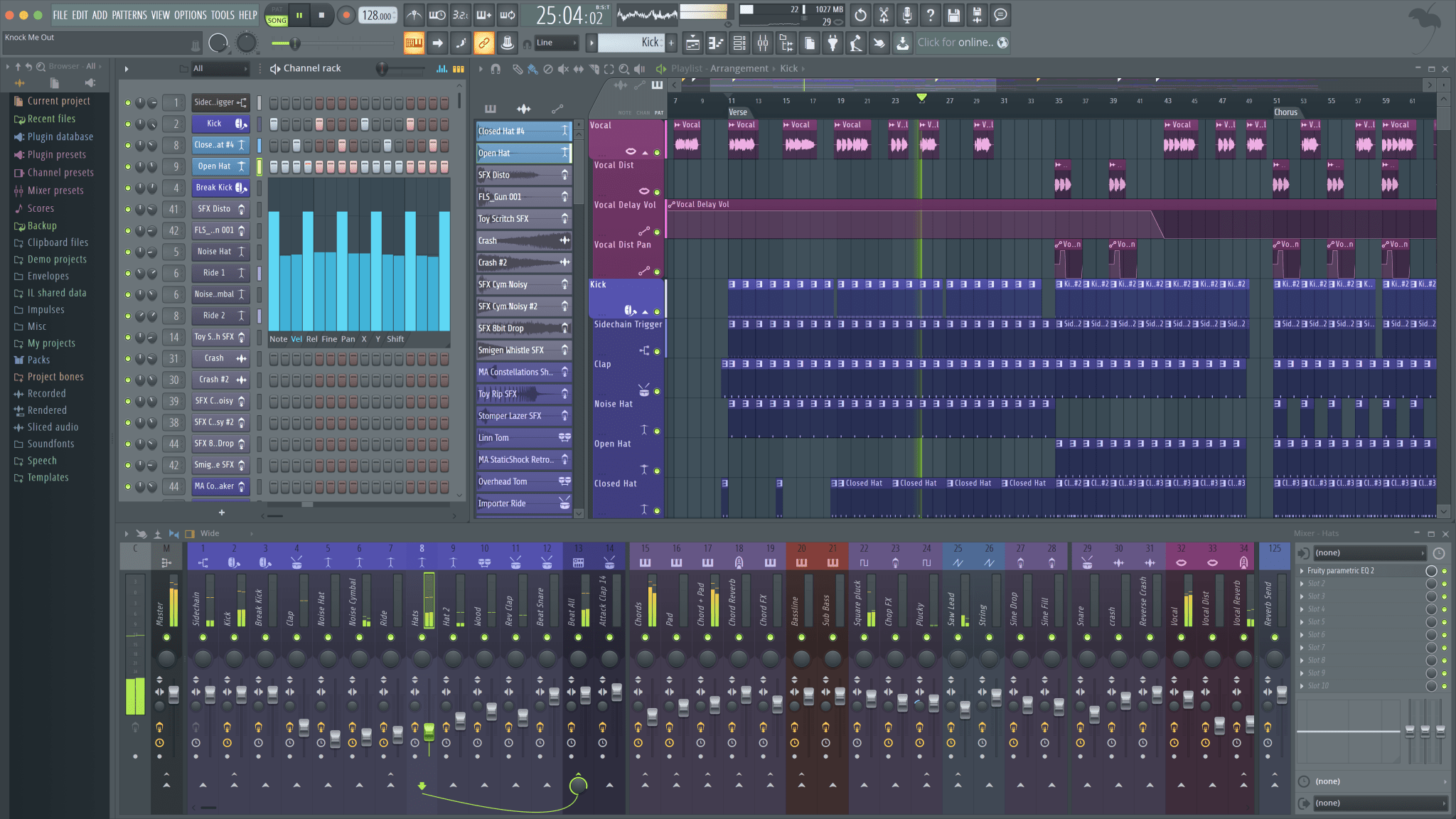
FL Studio is the most popular DAW in Hip-Hop for a reason.
Its pattern-based workflow matches how most producers think about beats. The piano roll is industry-leading. The mixer is intuitive. And the community—tutorials, templates, help forums—is massive.
But most producers barely scratch the surface of what FL Studio can do. They use maybe 20% of its features, repeating the same workflow on every beat. Understanding FL Studio's deeper capabilities transforms not just speed, but creative possibility.
The DAW you already own is more powerful than you think.
Piano Roll Mastery
FL Studio's piano roll is famous for a reason—it's the best in any DAW. But most producers know only basic functions. Learning its advanced features cuts production time dramatically.
Ghost notes show you other patterns' MIDI data as faded background notes. When writing melodies, enable ghost notes to see your chords while composing. This visual reference prevents clashing notes and helps you write harmonically coherent parts.
The stamp tool places pre-drawn patterns—chords, scales, rhythms—with a single click. Build a library of your most-used chord shapes. When inspiration strikes, you can build progressions in seconds instead of minutes.
Scale highlighting constrains the piano roll to notes in your chosen key. For producers still learning theory, this feature prevents wrong notes entirely. Set your key and mode; the piano roll shows which notes work.
Glide notes create the pitch slides essential for modern 808 patterns. Hold Alt while drawing a note to create a glide. The note slides up to the next note in the pattern—instant portamento without automation.
Workflow Optimization
Templates save everything that repeats between sessions. Your mixer routing, your master bus processing, your default drum racks—set them once, save as template, never configure them again. The 30 minutes you spend creating templates saves hours over time.
Patcher nests multiple plugins into single instances. Create your go-to vocal chain—EQ, compression, de-esser, reverb—as one Patcher preset. Now every vocal gets consistent processing with one click.
Keyboard shortcuts deserve dedicated practice. Ctrl+B duplicates selected patterns or notes. Shift+Scroll adjusts grid size. Alt+drag copies items. Learn these until they're muscle memory, and you'll work twice as fast.
Color coding keeps sessions organized. Assign colors to instrument groups—all drums one color, all melodies another. When sessions get complex, visual organization prevents confusion.
Mixing in FL Studio
FL Studio's mixer is deceptively powerful. Those simple-looking channel strips hide professional-grade routing capabilities.
Send routing creates parallel processing chains. Route your drums to a send channel, add compression, blend back with the dry signal. This parallel compression technique—used in professional mixes—adds punch without squashing dynamics.
The mixer's built-in EQ is actually good. Parametric EQ 2 handles most tasks professional EQ plugins do. Before buying third-party plugins, learn what's already included. Mixing fundamentals matter more than plugin selection.
Sidechain compression in FL Studio works through the plugin's sidechain menu—not mixer routing. Open your compressor, click the sidechain icon, select your source. Common confusion solved.
Track grouping creates submixes for easier control. Route all drum channels to a drum bus, all melodic elements to a melody bus. Now you can adjust overall drum level without touching individual tracks.
Sound Design Tools
Sytrus comes free with FL Studio and rivals expensive synthesizers. Its FM synthesis creates sounds impossible with basic subtractive synthesis. For producers making aggressive, modern sounds, Sytrus deserves attention.
Harmor offers additive synthesis and resynthesis—turning audio into playable patches. Sample a vocal snippet, load into Harmor, play it as a synth. This unique capability creates textures no preset can provide.
Gross Beat transforms patterns with real-time time and volume manipulation. That half-speed effect on your hi-hats? The stuttering vocal chop? Gross Beat does this natively, without bouncing to audio.
But stock plugins have limits. As you develop, third-party VSTs expand your palette. The key is mastering FL Studio's native tools first—they're more capable than most producers realize.
Sampling and Audio Work
Edison, FL Studio's audio editor, handles sample editing, recording, and processing. Learn its time-stretching algorithms—some work better for drums, others for melodic content.
Slicex chops loops into playable slices. Load a drum break, Slicex detects transients and maps each hit to a key. Rearrange, add swing, create new patterns from existing material. Essential for boom bap production.
NewTone provides basic pitch correction for vocals. It's not Auto-Tune, but for gentle correction and understanding pitch, it's sufficient. Paired with Edison for editing and Vocodex for effects, FL Studio handles vocal production without additional purchases.
Performance and Stability
Buffer size affects latency and stability. For recording, use lower buffer sizes (128-256 samples) to minimize delay. For mixing, raise it (512-1024) to reduce CPU strain. Know which mode your session needs.
Smart Disable automatically deactivates plugins not currently processing audio. Enable this in Audio Settings to reduce CPU load on complex sessions without manually bypassing plugins.
Bounce in place renders CPU-heavy tracks to audio, freeing resources. That Omnisphere pad eating 15% CPU? Bounce it. You can always unfreeze if changes are needed.
Best Free Drum Kits and Sound Packs for FL Studio
One of the first things every FL Studio producer searches for is drum kits and sound packs. The right starter pack transforms your production immediately -- professional-sounding drums make even simple patterns hit harder. Here is where to find the best free options and how to organize them.
Built-In Packs You Already Have
Before downloading anything, explore what FL Studio ships with. Open the Browser panel and navigate to Packs. Image-Line includes a solid collection of drum samples, instrument one-shots, and loops. The quality is higher than most producers realize because they skip straight to third-party downloads. Spend thirty minutes auditioning what is already installed -- you may find sounds that work perfectly for your next beat.
Top Free Download Sources
- Cymatics Free Packs -- Cymatics consistently releases professional-quality sample packs for free. Their "Cobra" and "Oracle" collections include drum one-shots, 808s, loops, and MIDI files. These packs rival paid alternatives and load directly into FL Studio's sampler channels.
- Reddit r/Drumkits -- The largest community-driven drum kit library online. Producers share original kits regularly. Sort by top posts to find the highest-rated collections. Many kits come organized by type (kicks, snares, hi-hats, percussion), which saves setup time.
- Splice Free Tier -- Splice offers a limited number of free credits for new users. Use them strategically on individual sounds rather than full packs, and you can build a targeted library of exactly the sounds you need.
- PARADISO Sound Kit Free Sample Pack -- A curated selection from the full 2,350+ sound library, designed specifically for hip-hop and R&B. Sign up below to download the free kit and hear the difference professional sounds make.
What Should Be in Your FL Studio Starter Pack
A complete starter pack for FL Studio hip-hop production should include at minimum: a variety of kick samples (punchy, soft, layered), multiple snare types (crisp trap snares and boomy boom-bap snares), hi-hat one-shots plus open hats and rolls, clap samples (these often replace or layer with snares in trap), tuned 808 bass samples, and percussion (shakers, rim shots, toms, wood sounds). Having all these categories covered means you can build complete drum patterns without stopping your creative flow to hunt for missing sounds.
Piano Drum Kits for FL Studio
A "piano drum kit" typically refers to a production kit that combines piano melody loops with drum one-shots -- everything you need to build a complete beat in one download. These kits are popular because they eliminate the gap between having drums and having melodies to put over them. When using piano loops from a kit, always check the labeled key so your 808 and any additional melodic elements play in harmony. In FL Studio, you can detect the key of a loop using NewTone or by ear-matching against the piano roll's scale highlighting feature.
Organizing Your Downloads
As your sample library grows, organization becomes critical. Create a folder structure on your hard drive sorted by type: Kicks, Snares, Hi-Hats, 808s, Loops, One-Shots. In FL Studio, add your sample folders to the Browser by right-clicking in the Browser panel and selecting "Add folder." Tag your favorite sounds with color labels. This investment in organization pays off every session -- you will find sounds in seconds instead of minutes.
What Are Some Popular Plugins or Sound Packs for FL Studio?
FL Studio's native plugins are more capable than most producers give them credit for. Sytrus delivers FM synthesis that rivals expensive third-party options. Harmor provides additive and resynthesis capabilities unique among free-included instruments. Flex is Image-Line's newest synth, offering modern presets that work immediately for hip-hop. Before investing in third-party tools, master what ships with your DAW.
When you are ready to expand, these plugins dominate hip-hop production in FL Studio:
- Omnisphere -- The industry standard for pads, keys, and atmospheric textures. Expensive but unmatched in sound quality and library depth.
- Serum -- The most popular wavetable synthesizer for modern trap production. Visual feedback makes sound design intuitive.
- Kontakt -- The standard sampler platform. Thousands of third-party libraries cover every instrument and genre.
- ElectraX / Electra2 -- A hip-hop staple with warm analog modeling and an enormous preset community.
For sound packs, the PARADISO Sound Kit provides 2,350+ sounds including drums, 808s, melody loops, and VST presets -- all optimized for FL Studio workflows. Cymatics' "Cobra" collection and Splice's genre-specific packs are also strong options. The key is choosing packs designed for your genre rather than generic "mega bundles" that spread quality thin across too many styles.
How to Save Drum Patterns in FL Studio
Saving your drum patterns lets you reuse proven grooves across projects without rebuilding them from scratch. There are several approaches, each suited to different workflows.
The quickest method: right-click the pattern in the Channel Rack or Playlist, select "Save as..." and save it as an .fst file. This stores the pattern data that you can load into any future project. For maximum flexibility, export the pattern as MIDI (File > Export > MIDI), which preserves note data and works across different DAWs and instruments.
A better long-term approach is creating template projects. Build a project with your go-to drum patterns pre-loaded -- a standard trap pattern, a boom bap groove, a half-time feel, and whatever other rhythms you use frequently. Save this as your default template (Options > File Settings > set as default template). Every new project starts with your patterns ready to go, and you can delete what you do not need rather than building from zero each time.
Ready to level up?
Great beats start with great sounds. The PARADISO Sound Kit delivers 2,350+ production-ready sounds—drums that punch, tuned 808s, and melodies that inspire.
Grab our free sample kit and hear the difference:

Von Peter Lam